SMS Consent and Opt-In Evidence
How users of the software platforms ItWorks operates agree to receive text messages, and what those messages are.
Last updated: August 12, 2026
Who receives these messages
ItWorks Technical Business Solutions builds, hosts, and operates software platforms for business clients. The people who sign in to those platforms are the client's own employees and contractors - for example, the drivers using a load-management application we operate for a haulage contractor.
They are not visitors to this website, and they do not sign up here. They are enrolled by an administrator at the client, inside the application. That is why the consent flow is documented on this page rather than shown as a form: it happens behind a login.
ItWorks is named as the operator throughout those platforms - in the application header, in the footer of every page, and in the driver's own portal - so the name on the text message is the name on the screen the recipient signs in to.
What we send
Two messages, both sent only in response to a sign-in the user has just asked for. There is no marketing, and no message is sent unprompted.
- A one-time sign-in code.
ItWorks: your sign-in code is 481920. It expires in 5 minutes. If you did not ask for this, ignore it. Reply STOP to opt out. - A single-use sign-in link, when the user texts us asking for one.
ItWorks: tap to sign in https://bc.itworksdev.com/Account/SmsLinkLogin?token=k7Qm2xR9
                    Expires in 10 minutes, one use only. Reply STOP to opt out.
How consent is obtained
- An administrator at the client asks the person whether they agree to receive one-time sign-in codes and account notifications by text, at their mobile number.
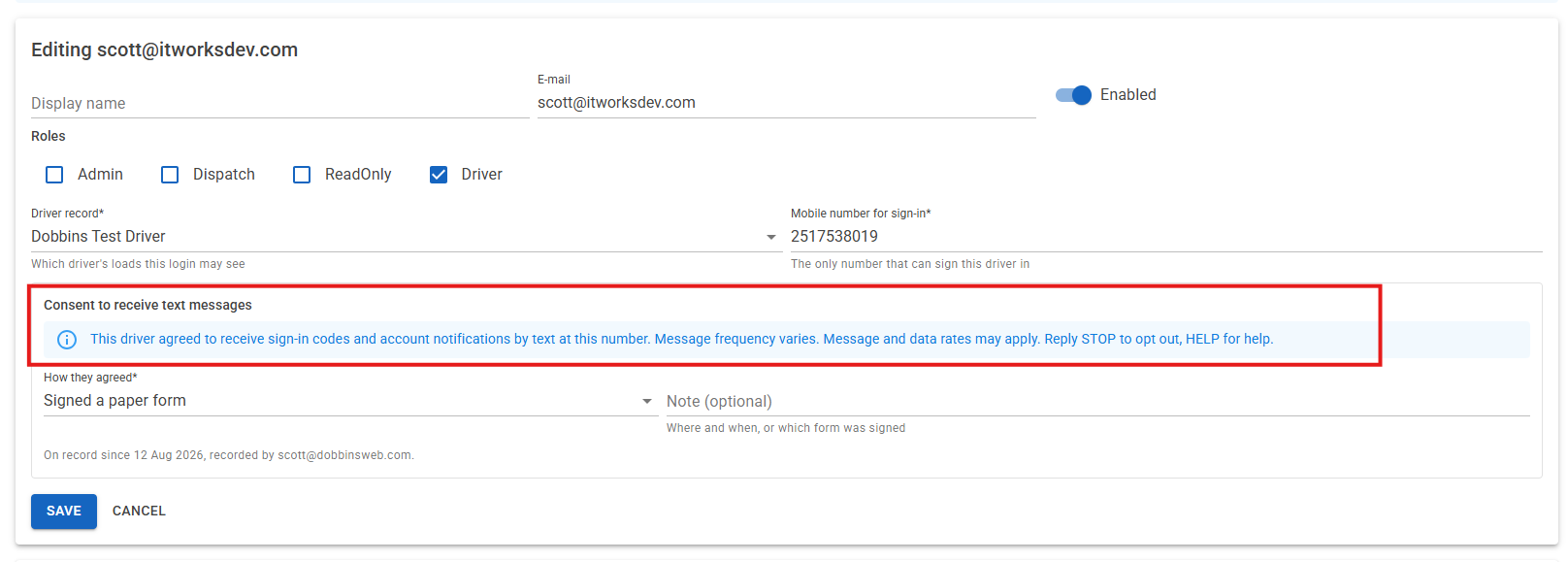
- Having been told yes, the administrator opens the user administration screen in the platform, enters the mobile number, and completes the consent panel shown below.
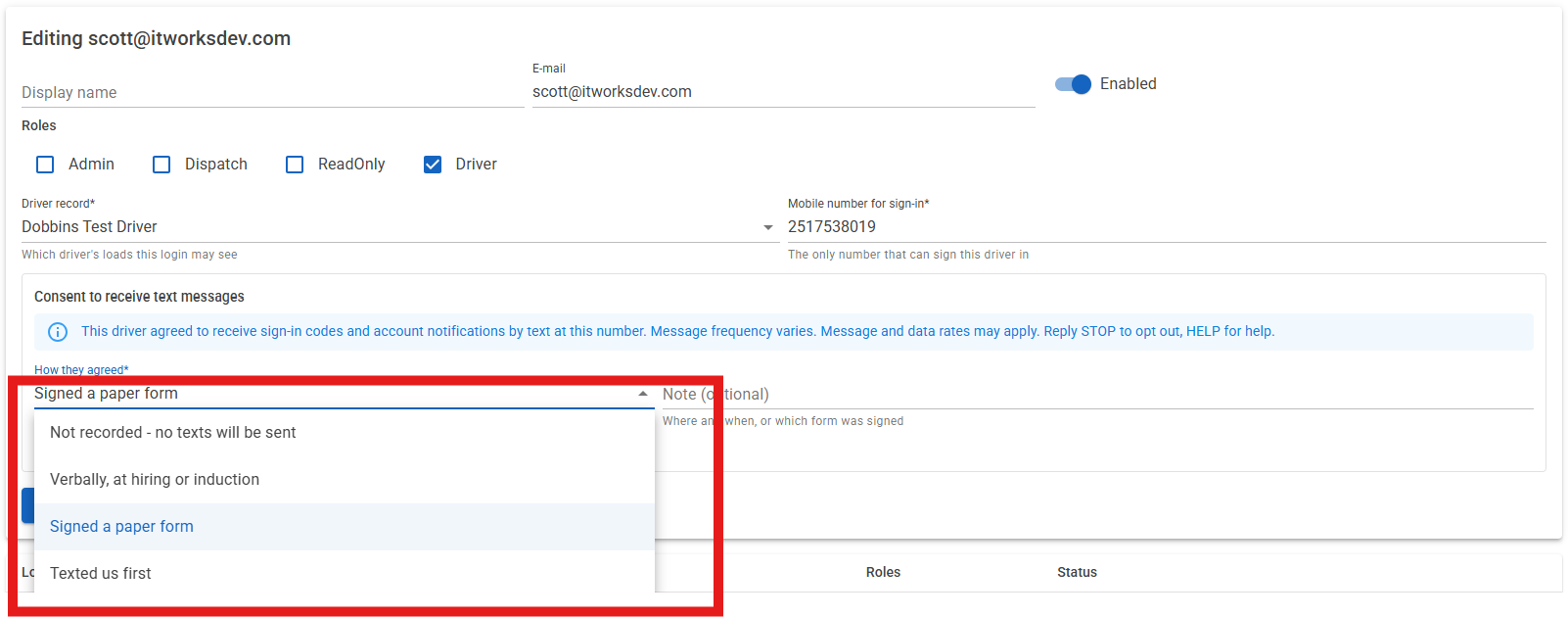
- The administrator selects how the agreement was given: verbally at hiring or induction, on a signed paper form, or because the person texted us first.
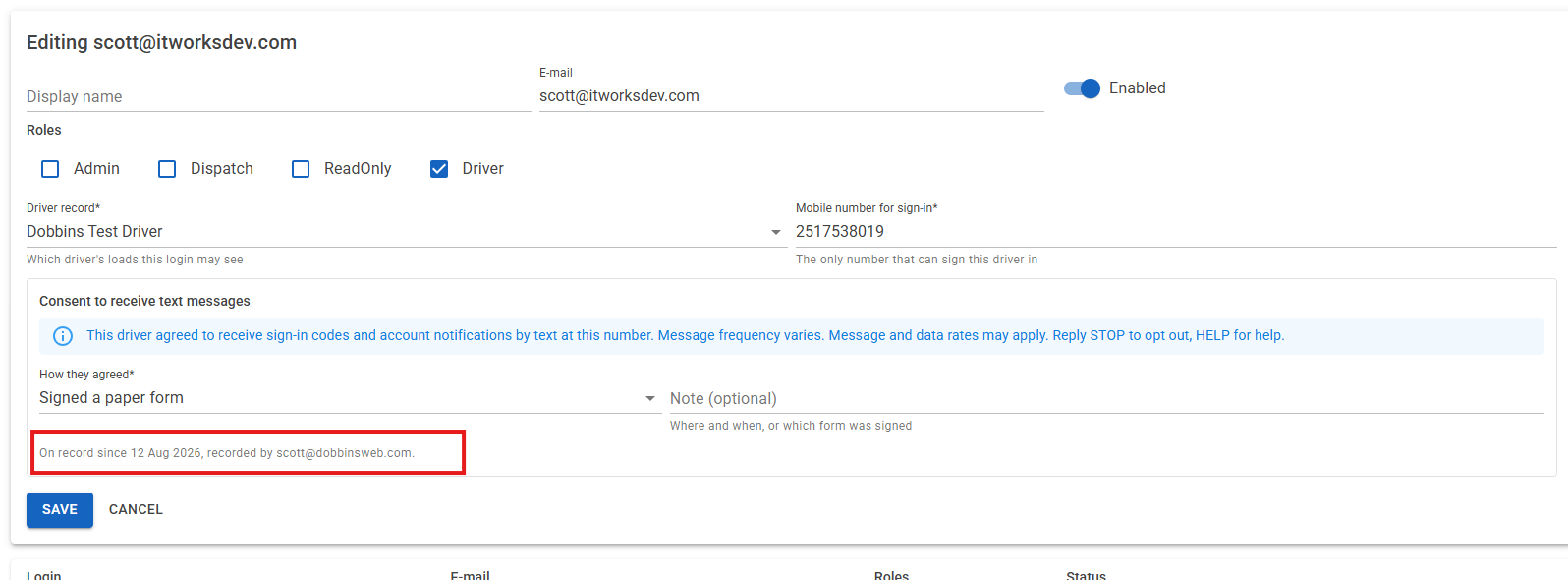
- The platform stores that method together with the date, the administrator's own name, and any note they add about where or when the agreement was given.
Consent cannot be skipped. The screen refuses to save a mobile number with no method selected, and the messaging code refuses to send to any number with no consent recorded against it.
The wording the administrator sees
This text appears on the consent panel, above the method selection, exactly as written here:
This driver agreed to receive sign-in codes and account notifications by text at this number, sent by ItWorks. Message frequency varies. Message and data rates may apply. Reply STOP to opt out, HELP for help.
The consent screen
Screenshots of the enrolment flow in the administration area of a platform we operate.
Message frequency and cost
Message frequency varies and depends on how often the user signs in. A user who signs in once a week receives roughly one message a week. Message and data rates may apply; ItWorks does not charge for text messages, but your mobile carrier's standard rates apply.
Opting out and getting help
Reply STOP to any message to stop receiving texts. Also accepted: STOPALL, UNSUBSCRIBE, CANCEL, END, QUIT. You will get one confirmation and nothing after that.
Because these messages are how a user signs in, opting out also means they can no longer sign in by text. Reply START to resubscribe, or ask an administrator at your employer to arrange another way in.
Reply HELP for assistance, or contact us at Scott@itworksdev.com or 251-753-8019.
Mobile information and third parties
No mobile information will be shared with third parties or affiliates for marketing or promotional purposes. Text messaging originator opt-in data and consent are not shared with any third parties. Full detail is in our Privacy Policy and Terms and Conditions.